
TABLE OF CONTENTS
How We Handle Product Weight
- Omnivore imports the product weight from your eCommerce store.
- Weight is imported at the product level, not at a variant level.
- By default, Omnivore assumes this weight is in kilograms. If you see a decimal point (e.g.
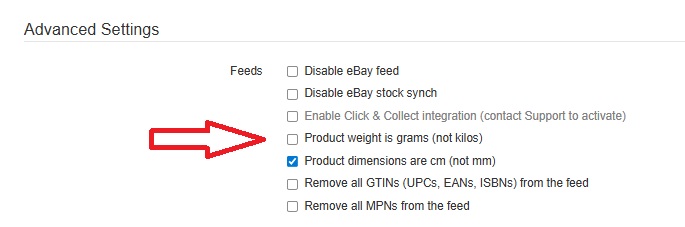
1.25), we interpret that as “1 kg 250 g”. - If your store uses grams instead of kilograms, you must tell Omnivore explicitly.
Go to Settings → eBay Australia → General
Scroll down to Advanced Settings under feeds
Tick the box labelled “Product weight is grams (not kilos)”
- Once correctly set, Omnivore will push that weight value to eBay Australia so it can be used for any weight-based shipping method you choose.
When This Matters
You need accurate weight data when you use any of these shipping types on eBay:
Rate Tables (where shipping cost is calculated per kg or by weight bands).
Calculated Shipping (where shipping cost depends on product weight/size).
If weight is missing or incorrect, shipping costs will calculate incorrectly — leading to undercharged or overcharged postage.