
eBay LINK connects to your WooCommerce store via the Rest API. Follow these instructions so that we can connect.
Step 1:
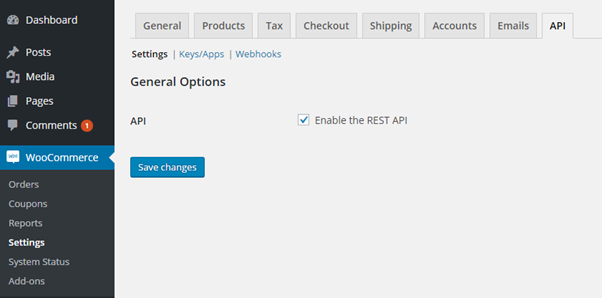
Make sure that the REST API is enabled. Go to WooCommerce > Settings > API tab and tick the Enable REST API checkbox.
Step 2:
Check that you are using WordPress permalinks on Settings > Permalinks.
Step 3:
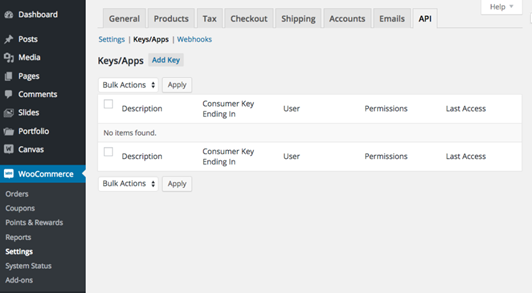
Generate an API Key for eBay LINK go to WooCommerce > Settings > API > Keys/Apps.
Step 4:
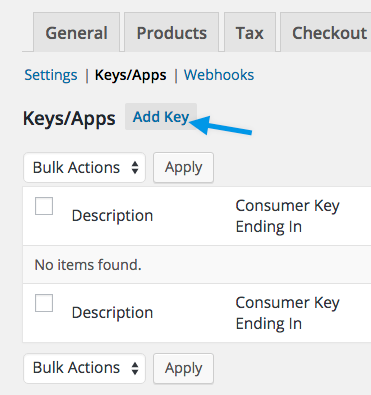
Select Add Key
Step 5:
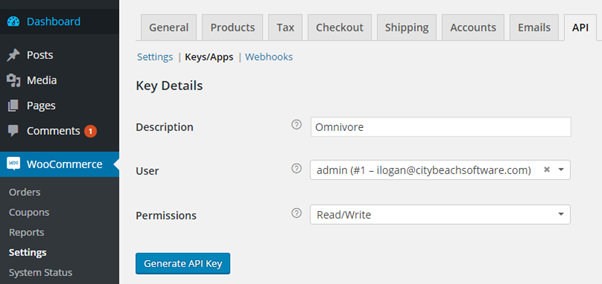
In the Description field type eBay LINK and in the User Field select a user. In the Permissions drop down, select Read/Write. Click Generate API Key
Step 6:
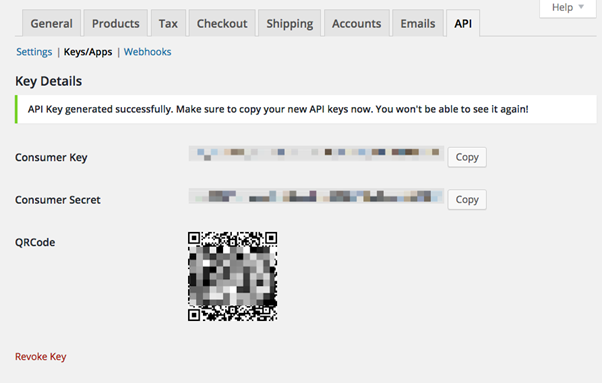
You should see two new keys, a QRCode, and a Revoke API Key button. These two keys are your Consumer Key and Consumer Secret. NB: WooCommerce won’t show you these again once you leave the page so make sure you copy and paste them before you navigate away from this screen.
Step 7:
Provide the Consumer Key and the Consumer Secret and the URL of your store to the person helping you with set up OR: start the set up process in a new window.
To sign up for eBay LINK: Go to eBay LINK sign up, enter your email address and click register.