
Overdue Order Email Notifications
We send overdue order notifications because most marketplaces measure seller performance based on how quickly orders are shipped. If an order hasn’t been marked as shipped within 5 days of creation, you’ll receive an email alert so you can take action.
What the notification means
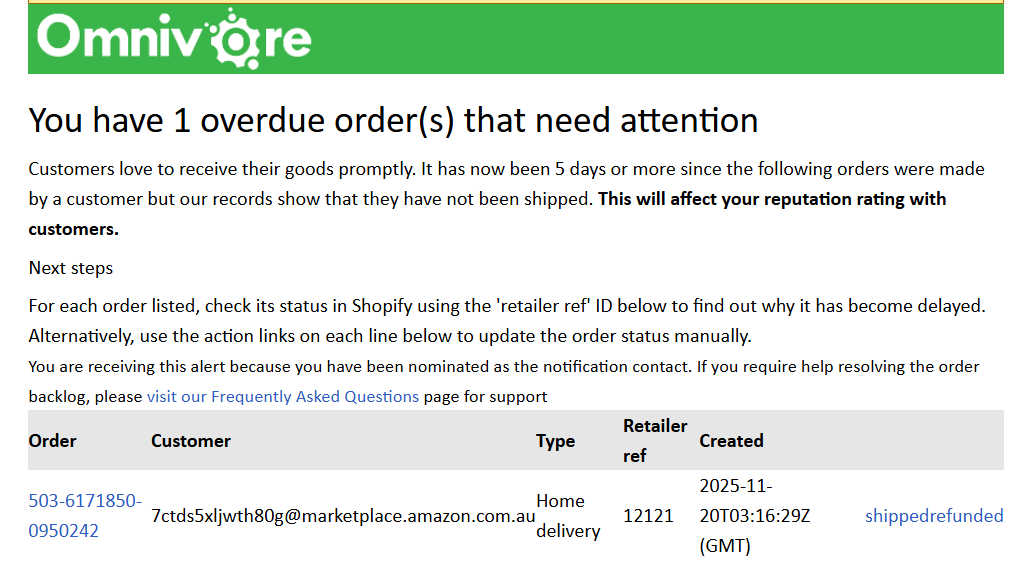
The email tells you which orders are overdue — meaning they haven’t been marked as shipped in eBay LINK or your connected system. These notifications help you avoid negative impacts on your seller performance and customer experience.
How to resolve an overdue order
To clear an overdue order from the list, you must either:
-
Mark the order as shipped in the eBay LINK Order screen; or
Mark the order as refunded in eBay LINK.⚠️ Marking an order as Refunded in eBay LINK does not issue a refund on the marketplace itself — it only tells eBay LINK the order is complete, so it’s removed from the overdue list.
If you received an overdue notification email, it will include quick links allowing you to update each affected order directly from the message.
Next steps after receiving a notification
-
Use the retailer reference ID shown in the email to locate the order in your eCommerce platform.
-
Check why the order hasn’t been dispatched.
-
If the order has been despatched, ensure the tracking details are added to your eCommerce platform. These will then sync to eBay LINK / eBay LINK and update to the marketplace.
-
Alternatively, update the order status (shipped or refunded) using the links in the email or in the eBay LINK Order screen.