
Sometimes, the thumbnail images in eBay’s gallery view show up as a generic polaroid-style placeholder — even though your full listing images look fine when you click through.
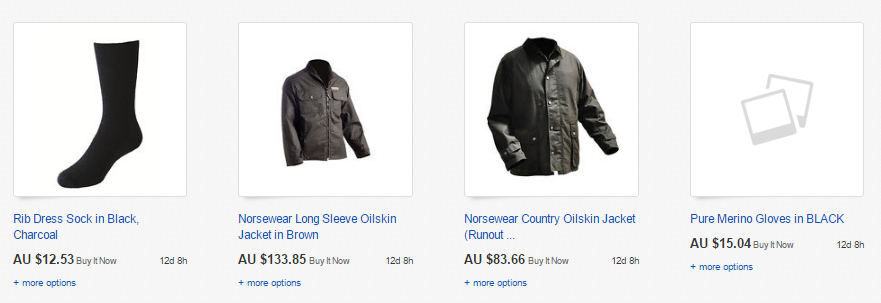
There are a few common causes for this. You will need to work thorugh each of the steps below to resolve the issue.
Image Colour Format Is Incorrect
If your product images are saved in CMYK, eBay won’t support them properly — convert them to RGB.
You can convert images using tools like Adobe Photoshop or online converters such as https://www.cmyk2rgb.com.
Because your images are hosted on your own eCommerce store, any changes need to be made there, not in Omnivore.
More information on eBay picture guidelines can be found here.
Cached or Old Images Need Refreshing
In Omnivore, go to Products → Product Actions → Product Images, and choose Force image update.
Wait at least 2–5 hours for the update to process, then check your eBay listing to see if the gallery images display correctly.

eBay Can’t Access Your Images
eBay checks for image data from the location where the images are hosted, and in the case of Omnivore retailers product images are hosted on the sellers eCommerce Store. We import the image in the form of an image URL which we send to eBay, but the image itself remains 'hosted' on your site.
Since images are served from your own site, sometimes eBay can’t fetch them quickly (or at all), causing it to fall back to a placeholder.
To prevent this, whitelist eBay’s IP addresses on your server so their requests won’t be blocked.
66.135.202.64/27
66.135.202.32/28
66.135.202.160/27
66.135.195.0/27
66.211.183.64/28
216.113.184.96/27
66.135.223.32/28
After whitelisting, run a full import in Omnivore which will trigger an Upload to eBay. Depending on how many products you have, the update may take up to a day.
If you have checked and tried all of these and the image view issue still persists please contact our Support Team for help.