
Use this guide to map product data from your ecommerce store to marketplace attributes in Omnivore.
Different ecommerce platforms use different names for this type of product data:
- Shopify: Metafields
- WooCommerce: Product attributes or custom attributes
- BigCommerce: Custom fields
- Magento: Product attributes
In Omnivore, this data is used as product attributes and can be mapped to the relevant marketplace attribute.
Before you start
-
Omnivore can only show store product data for mapping after that data has been added to at least one product in your ecommerce store and saved with a value.
-
If a Shopify metafield, WooCommerce product attribute, BigCommerce custom field, or Magento product attribute exists in your store setup but has not been added to a product, or has been left blank, it will not appear in Omnivore for mapping.
-
If the attribute was newly added or recently updated in your ecommerce store, you must run an import in Omnivore before trying to map it. The import pulls the new product data from your store into Omnivore.
NOTE:
This FAQ only covers how to apply a store added attribute to a single product in Omnivore. By using this method to map your store metafields to a single product, our system applies that attribute to all products in the marketplace category. So you only need to map the field on one product, the other products in that marketplace category will then have that metafield mapped as an attribute.
To follow this process you first need to add the product attribute data in your eCommerce store. Omnivore will import them so you can map the data to the relevant marketplace so they will appear on the Product Listing Page. Please follow the steps below.
Add Attribute Data in your Store
Add the product attribute data to products in your eCommerce platform. You may have completed this step already.
- Shopify - use Shopify Metafields in Shopify
- WooCommerce - set up with data mapping from WooCommerce
- BigCommerce - use the Custom Fields in BigCommerce
- Magento - set up with data mapping from Magento
Map Store Attribute Data to Products in Omnivore
Map your Product Attribute Data to the relevant Attribute in Omnivore
- Find a product in Omnivore. Go to 'Products - Marketplace Name Manage Listings' and find a product you want to add custom attributes to. Click the Product Title to view the full product details page.
- Scroll down to the section, eg 'Amazon Australia Product View' - 'Product Attributes'.
- On the left you will see your own Product Attributes from your eCommerce platform. You can then link the attributes to the relevant Marketplace Attribute (Amazon in this case) for example here collection will be mapped to
- special features. Choose from the drop-down then click the green + button. Do not worry if you do not have a dropdown option for your Attribute, this just means that the attribute you have will be sent to the marketplace without needing to be mapped.
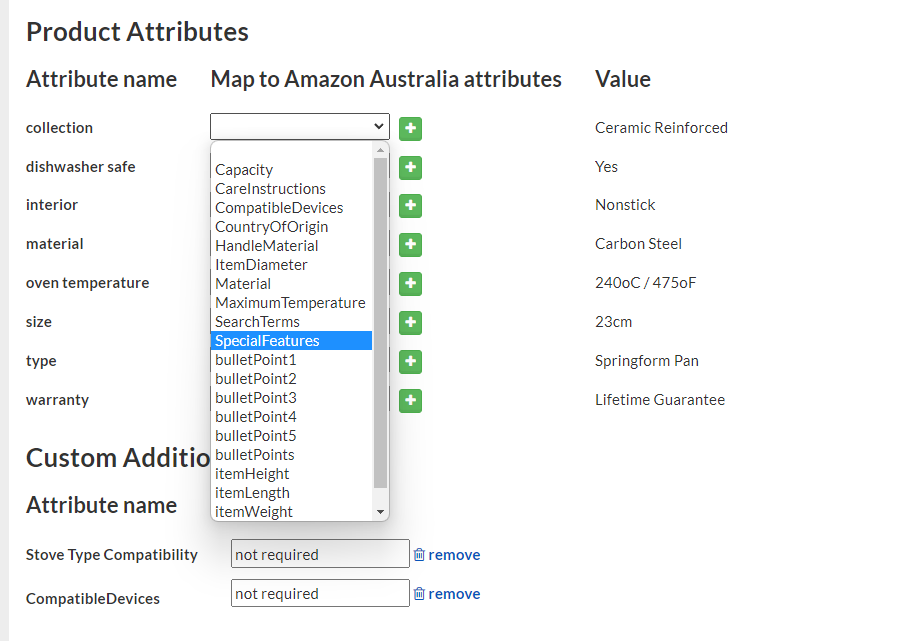
- Once you have finished mapping the attributes, you can click 'Upload to Marketplace' to update the product.
NOTE:
- You only need to map a Product Attribute from your eCommerce platform to a Marketplace Attribute once, our system will then automatically populate it for all other products in that category.
- If there are additional product attributes that you do not want on the Marketplace you can click the red 'x' button to block.
- Most markets will not use a Product attribute that is used to create variations for a Multi-variant products. These variation specifics will be listed in the Product Attributes list but they will not show as Attributes on the market.
- You can also use the Product Attributes from your eCommerce store for the Search and Filter however if your data does not match the marketplace you won't get the full benefit of search results. e.g you may have the Value 'Merino Cashmere Blend' in your eCommerce store but the marketplace requires Merino OR Cashmere.
Summary and Additional Reading
Within Omnivore there are several ways to apply your Store Attribute Data to your products in Omnivore. This method uses the Single Product for One Marketplace method.
If you are not sure about attribute mapping please contact our Support Team for assistance.